


Hey there,
Let’s count what’s sitting in your /specs/ folder right now.
If you’ve been running the system from Issues 03-08, you’ve accumulated specs from two sources: feedback analysis (Issue 06) and launch comments (Issue 08). A typical backlog after launch:
Fix: Rename confusing button. UX blocker, 3/4 testers mentioned it; 10 min build.
Feature: Response analytics dashboard. Most-requested feature: 20 min build.
Feature: Team sharing. 2 testers + 3 launch commenters asked; 18 min build.
Feature: CSV export. Came up in HN comments; 12 min build.
Fix: Mobile form layout. 2 testers mentioned, confirmed by launch feedback; 10 min build.
Feature: Email notifications on new responses. Top request from launch. 15 min build.
Six specs, built sequentially: 85 minutes of agent work + 30 minutes of your review time. One feature at a time, nearly two hours.
Now look at these specs: spec 1 (rename button) and spec 4 (CSV export) don’t touch the same files, spec 2 (analytics dashboard) and spec 5 (mobile form) don’t share any components. Spec 3 (team sharing) and spec 6 (email notifications) operate on different tables.
They’re independent; there’s no reason they have to wait in line. Any reason!
Built in parallel, two agents at a time, the same six specs take three batches of ~20 minutes each, plus review between batches. Total: about 75 minutes, but that’s wall-clock time, not your time. During each batch, you review the previous batch and prepare the next; your active work is maybe 40 minutes of reviews and handoffs.
The blocker: You run specs sequentially because that’s what one terminal does, but the backlog grows faster than your build rate. Features users asked for last week still aren’t live.
What changes today: You install a skill that reads your specs, analyzes which ones conflict, batches the independent ones together, and gives you exact terminal commands to run them in parallel. Two agents build while you review, three batches instead of six rounds.
The transformation: 6 specs in 2 hours (sequential) → 6 specs in 75 minutes (parallel). Same features, less wall-clock time, your review happens in the gaps.
Yesterday, building an n8n workflow meant opening the docs, dragging nodes, debugging connections, and hoping it would work.
Today it means: describing what you want in plain English and getting a complete, ready-to-deploy workflow in minutes, with a full guide so you actually understand what’s running.
Autom8n just went live.
The gap between “I have an automation idea” and “it’s running in production” just got a lot smaller.
Why Sequential Is the Default (And Why It Shouldn’t Be)
You’ve been running one agent because that’s how a terminal works: open Claude Code, give it a spec, it builds, you review, and you give it the next spec. That’s the workflow from Issues 04 and Issue 05. It works.
But it’s like having a team of three developers, assigning them one task at a time, and waiting for each to finish before the next person starts. You wouldn’t do that with real humans, don’t you? You’d look at the task board, figure out which tasks are independent, and let everyone work at the same time.
The reason you don’t do this instinctively with agents is risk, yes, the big unsaid. If two agents modify the same file at the same time, the second write overwrites the first; if two agents independently create the same component, you end up with duplicates; if two agents add routes to the same navigation file, one of the additions disappears.
These conflicts are real, but they’re predictable. If you know which files each spec touches, you know which specs conflict. Specs that don’t share files can run simultaneously with zero risk; the skill figures this out for you.
The Skill: parallel-build
This skill reads your specs, analyzes their file and table footprints, detects conflicts, and generates a batched execution plan with exact terminal commands.
parallel-build/
├── SKILL.md                            ← Parallel workflow, batching, monitoring
├── scripts/
│   └── analyze_deps.py                 ← Reads specs, finds conflicts, generates batches
├── references/
│   └── integration-checks.md           ← Post-build verification steps
└── assets/
    └── parallel-tracker.md             ← Track batch progress, issues, time saved
Install it:
# From GitHub:
git clone https://github.com/shipwithai/skills.git /tmp/shipwithai-skills
cp -r /tmp/shipwithai-skills/parallel-build .claude/skills/parallel-build
rm -rf /tmp/shipwithai-skills

# Verify:
ls .claude/skills/parallel-build/
# SKILL.md  scripts/  references/  assets/
The skill triggers in Claude Code when you say things like:
“I have a batch of specs to build”
“Which of these specs can I run in parallel?”
“Plan a parallel build session”
“I want to build all my feedback specs today”
“Can I run multiple agents on these?”
What happens when it triggers:
Runs
scripts/analyze_deps.pyon your specs — extracts file paths, tables, and components from each specDetects conflicts — two specs touching the same file or table
Groups specs into parallel batches — specs in the same batch are safe to build simultaneously
Generates terminal commands for each batch
Creates a tracking document at
/docs/parallel-tracker.md
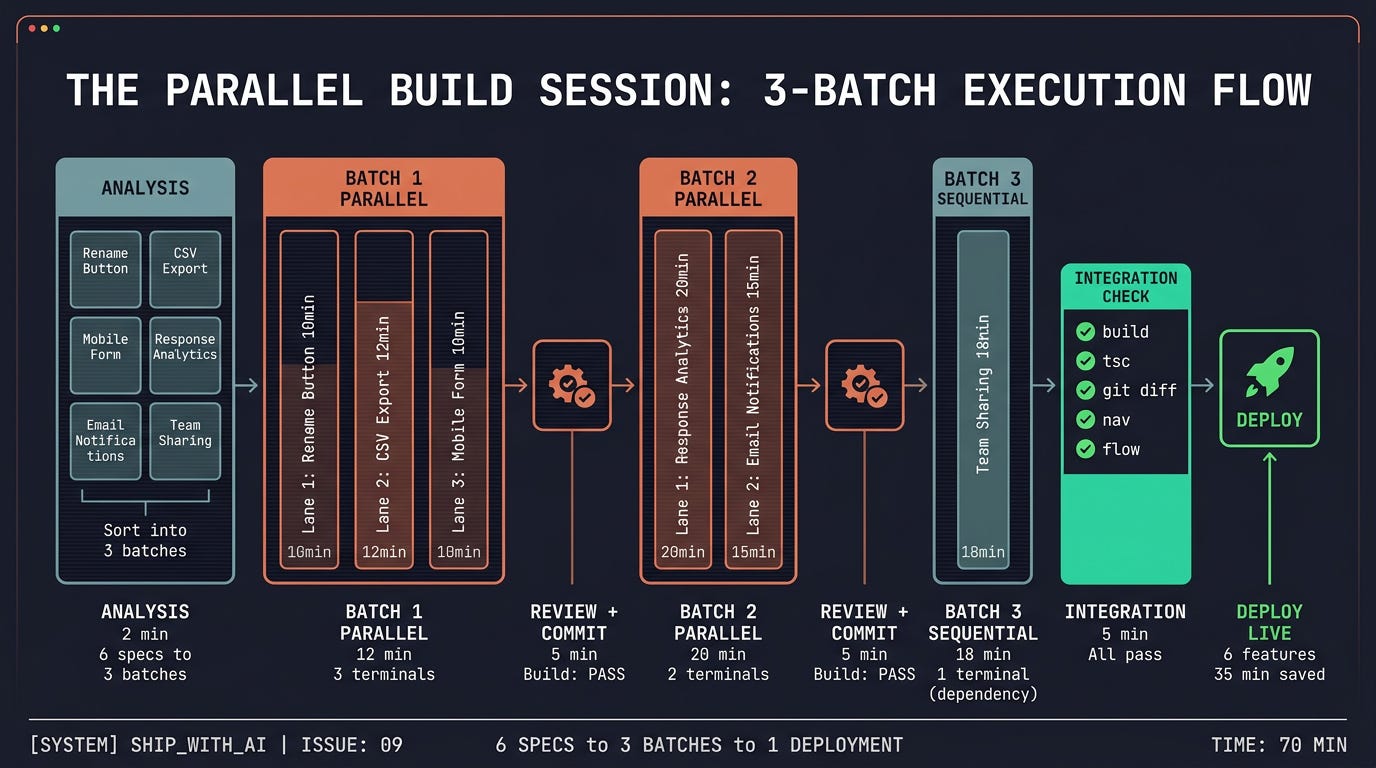
The Parallel Build Session
Here’s what happens when you have 6 specs ready and open Claude Code:
I have 6 specs in /specs/ ready to build. Analyze dependencies and plan
a parallel build session.
Step 1: Dependency Analysis (2 minutes)
The skill runs scripts/analyze_deps.py --dir /specs/. You see output like:
DEPENDENCY ANALYSIS: 6 specs

CONFLICTS FOUND:
⚠️  "Response Analytics" and "Email Notifications" both modify
    /app/api/responses/route.ts
    → Recommendation: run sequentially (different batches)

⚠️  "Team Sharing" and "Response Analytics" both write to
    the responses table
    → Recommendation: run sequentially (different batches)

NO CONFLICTS:
✅ "Rename Button" + "CSV Export" + "Mobile Form Layout" — no shared files
✅ "Team Sharing" + "CSV Export" — no shared files
✅ "Email Notifications" + "Mobile Form Layout" — no shared files

BATCHES:
Batch 1 (parallel, ~12 min):
  - Rename Button (10 min)
  - CSV Export (12 min)
  - Mobile Form Layout (10 min)

Batch 2 (parallel, ~20 min):
  - Response Analytics (20 min)
  - Email Notifications (15 min)

Batch 3 (sequential, ~18 min):
  - Team Sharing (18 min) — depends on Response Analytics changes

SUMMARY:
  Sequential time: 85 min
  Parallel time: 50 min
  Time saved: 35 min (2.4x speedup at peak, 1.7x overall)
The analysis caught that Response Analytics and Email Notifications both touch the same API route, so they go in separate batches. Team Sharing depends on the response table changes from Analytics, so it goes last; everything else is independent.
Step 2: Commit Before Starting
The skill reminds you:
Before starting the parallel session, commit your current state:

  git add -A && git commit -m "pre-parallel-build checkpoint"

This gives you a clean rollback point if any agent goes off-script.
You do: Commit. This takes 10 seconds and saves you if anything goes wrong.
Step 3: Execute Batch 1
The skill generates exact commands:
BATCH 1 — Open 3 terminals and run:

Terminal 1:
  claude "Read the spec at /specs/fix-rename-button.md and build it.
  Follow all existing skills."

Terminal 2:
  claude "Read the spec at /specs/feature-csv-export.md and build it.
  Follow all existing skills."

Terminal 3:
  claude "Read the spec at /specs/fix-mobile-form.md and build it.
  Follow all existing skills."

Estimated time: ~12 minutes (longest spec in batch).
While waiting: review the specs for Batch 2.
You do: Open three terminal windows or tabs, copy-paste each command. All three agents start building simultaneously. While they work, you review the Batch 2 specs to make sure they’re ready.
What you see: Three terminals scrolling at the same time. Three features are being built in the time it takes to build one.
Step 4: Review Batch 1 (5 minutes)
When agents finish, review each feature. Same process as Issue 04, check acceptance criteria from the spec, not line-by-line code review.
The skill prompts:
Batch 1 agents finished. Review each:

1. Rename Button — check: button text changed, tooltip present, clipboard still works
2. CSV Export — check: export button visible, downloads valid CSV, correct columns
3. Mobile Form — check: form renders on mobile viewport, inputs usable, submit works

After review:
  git add -A && git commit -m "batch-1: button fix, csv export, mobile form"

Then run: npm run build
If build passes, proceed to Batch 2.
You do: Review, commit, build, check passes. Move on.
Step 5: Execute Batch 2
BATCH 2 — Open 2 terminals:

Terminal 1:
  claude "Read the spec at /specs/feature-response-analytics.md and build it.
  Follow all existing skills."

Terminal 2:
  claude "Read the spec at /specs/feature-email-notifications.md and build it.
  Follow all existing skills."

Estimated time: ~20 minutes.
While waiting: test Batch 1 features in the browser.
File any bugs as quick fix specs.
You do: Two terminals, agents build, you test the three features from Batch 1 in the live app. If you find a bug, write a one-line fix spec for later.
Step 6: Review Batch 2, Execute Batch 3
Review analytics and notifications. Commit. Build check.
Batch 3 is sequential, team sharing depends on the analytics changes, one terminal, one spec.
Step 7: Integration Check (5 minutes)
After all batches, the skill runs integration verification from references/integration-checks.md:
POST-BUILD INTEGRATION:

1. npm run build — ✅ passes
2. npx tsc --noEmit — ✅ passes
3. git diff --stat — 14 files changed (expected: 12-16 based on specs)
4. Navigation check — all 3 new pages in nav ✅
5. Core flow test — sign up → create form → submit → dashboard → ✅ works

All checks pass. 6 features integrated.
If something breaks, the references/integration-checks.md guide has the common issues and fixes: overwritten nav routes, duplicate components, and conflicting CSS.
Session Complete
PARALLEL BUILD SESSION COMPLETE

Specs built: 6
Batches: 3 (parallel: 2, sequential: 1)
Actual time: 58 minutes
Sequential estimate: 85 minutes
Time saved: 27 minutes
Issues: 0

Deploy when ready: npx vercel --prod
Six features under an hour. One evening instead of two.
When Parallel Helps vs. When It’s Overhead
Be honest: parallel builds aren’t always worth it.
Worth it (2+ agents):
4+ independent specs in the backlog
Post-launch feature batch (feedback + launch comments)
MVP session (Issue 05) with 5+ features
Multiple bug fixes that touch different files
Not worth it (stick with sequential):
2-3 specs that share files or tables
Specs that depend on each other’s output
Quick fixes under 10 minutes each — the overhead of setup exceeds the time saved
First time building a new feature type — watch the agent, learn the pattern, then parallelize future instances
The sweet spot is 2 parallel agents. Two terminals are easy to monitor. The conflict risk is manageable. The speedup is real, two 15-minute specs in 15 minutes instead of 30. Three agents work if all specs are truly independent. Four or more on the same codebase creates merge pain that erases the time savings.
Same Backlog, Two Approaches
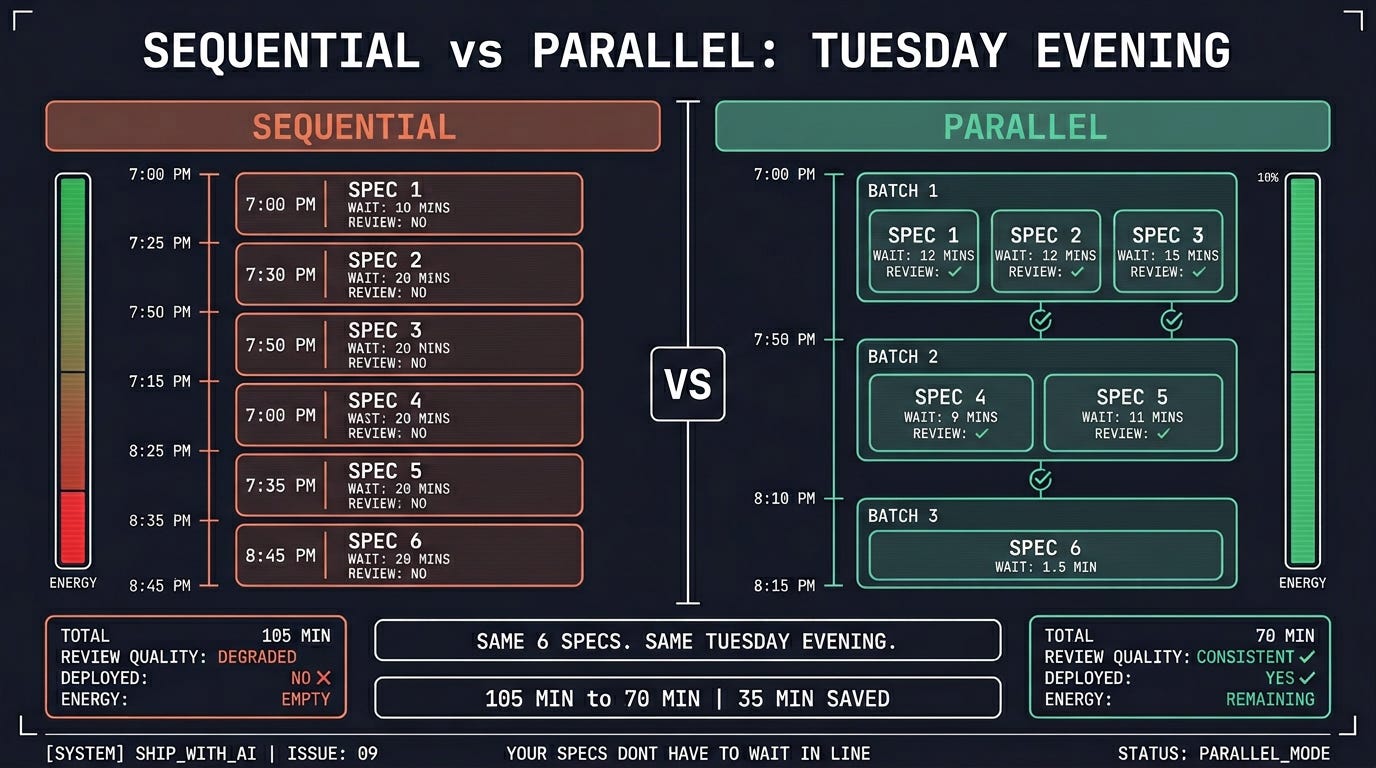
Six specs from launch feedback.
Sequential approach:
Tuesday evening: Open Claude Code. 7:00 PM: Hand off spec 1. Wait. Review. 15 min. 7:15 PM: Hand off spec 2. Wait. Review. 22 min. 7:37 PM: Hand off spec 3. Wait. Review. 20 min. 7:57 PM: Getting tired. Hand off spec 4. Wait. Review. 14 min. 8:11 PM: Two more. Losing energy. Hand off spec 5. Wait. Review. 18 min. 8:29 PM: Spec 6. Too tired to review properly. “Looks fine.” 16 min. 8:45 PM: Done. Exhausted. No energy to test or deploy. “I’ll deploy tomorrow.”
Total: 105 minutes. Six sequential handoffs. Review quality degraded by the end. No deployment.
Parallel approach:
Tuesday evening: Open Claude Code. 7:00 PM: “Plan a parallel session for my 6 specs.” Analysis runs. Three batches. 7:05 PM: Open 3 terminals. Batch 1 starts. Review Batch 2 specs while waiting. 7:17 PM: Batch 1 done. Review 3 features. Commit. Build passes. 7:22 PM: Batch 2 starts (2 terminals). Test Batch 1 features in the browser. 7:42 PM: Batch 2 done. Review 2 features. Commit. Build passes. 7:47 PM: Batch 3 starts (1 terminal). Test Batch 2 features. 8:05 PM: Batch 3 done. Review. Integration check passes. 8:10 PM: npx vercel --prod. Deploy. Live. 8:15 PM: Done. Energy left over. DM testers: “The features you asked for are live.”
Total: 70 minutes. Three batch handoffs. Review quality consistently. Deployed and communicated.
Common Objections (And Why They’re Wrong)
“What if two agents edit the same file?”
That’s exactly what the dependency analysis prevents. The script reads every spec, extracts which files each one touches, and puts conflicting specs in separate batches. If it can’t determine the footprint from the spec (too vague), it defaults to sequential — conservative batching over risky parallelism.
“This is over-engineering for a side project.”
It’s a 2-minute analysis step before a build session. If the analysis says “all specs are independent, run them all at once,” you just saved 30 minutes. If it says “these two conflict, run them in sequence,” you just avoided an overwrite bug. Either way, the analysis is worth the 2 minutes.
“I only have 2-3 specs. Is it worth it?”
For 2 specs: marginal. You save 10-15 minutes. For 3+ independent specs: yes. And the habit compounds. Once you’re used to parallel builds, every post-feedback batch goes faster. This is about building the habit of throughput, not optimizing one session.
“My specs aren’t independent — they all touch shared components.”
Then you have two options. Option one: run them sequentially with the skill still handling order (it puts dependent specs in later batches). Option two: create a shared component first as its own spec, build it, then parallelize the features that use it. The second option is faster for 4+ specs that share the same dependency.
Here’s what you learned today:
Your specs don’t have to wait in line. Most specs from feedback and launch comments are independent; they affect different files and tables. The dependency analysis proves which are safe to run simultaneously.
The
parallel-buildSkill handles the hard part.scripts/analyze_deps.pyreads your specs, finds conflicts, and generates batched execution plans with exact terminal commands. You open terminals and paste.Two agents are the sweet spot. Easy to monitor, manageable conflict risk, real speedup. Three works for fully independent specs. Four or more creates merge overhead.
Review between batches, not after all batches. Commit after each batch. Run a build check. Catch issues before the next batch builds on top of them. Git commit before starting gives you a clean rollback point.
The time savings compound as backlog size increases. Two specs save 10 minutes. Six specs save 30+. The real value is post-launch: when feedback specs pile up, parallel builds keep your shipping velocity from dropping.
One issue left.
You can set up agents, give them missions, hand off work, build MVPs in sessions, get feedback, deploy, launch, and now build multiple features in parallel. The entire system is running.
Next week, we close the loop on the final issue. You’ll set up agents that build, test, and iterate overnight. You define what to build. You set the guardrails. You wake up to pull requests, not empty branches. That’s the endgame: shipping while you sleep.
Issue 10: Ship While You Sleep.
But first, look at your /specs/ folder. How many specs are waiting? Open Claude Code. Type “analyze my specs for a parallel build session.” The skill tells you which can run together. Open two terminals. Build two features at once. Review. Commit. Deploy.
Your users asked for these features last week. Give them the update tonight.
Now go build in parallel.
See ya next week,
— Ale & Manuel
PS. If this cuts your build sessions in half, share it with a developer who's still running one agent at a time.
And whenever you are ready, there are 2 ways I can help you:
1. AI Side-Project Clarity Scorecard (Discover what’s blocking you from shipping your first side-project)
2. NoIdea (Pick a ready-to-start idea created from real user problems)
Wow guys this is a gold mine! What an incredible deep dive! I’ll be featuring this in my tomorrow’s post if you don’t mind :) kudos for the great work. 👏