
Your Context Is the New API Key: Why Single-File Projects Win in 2026
If your agent can't fit your project in its context window, the output gets worse. Here's how to fix it.


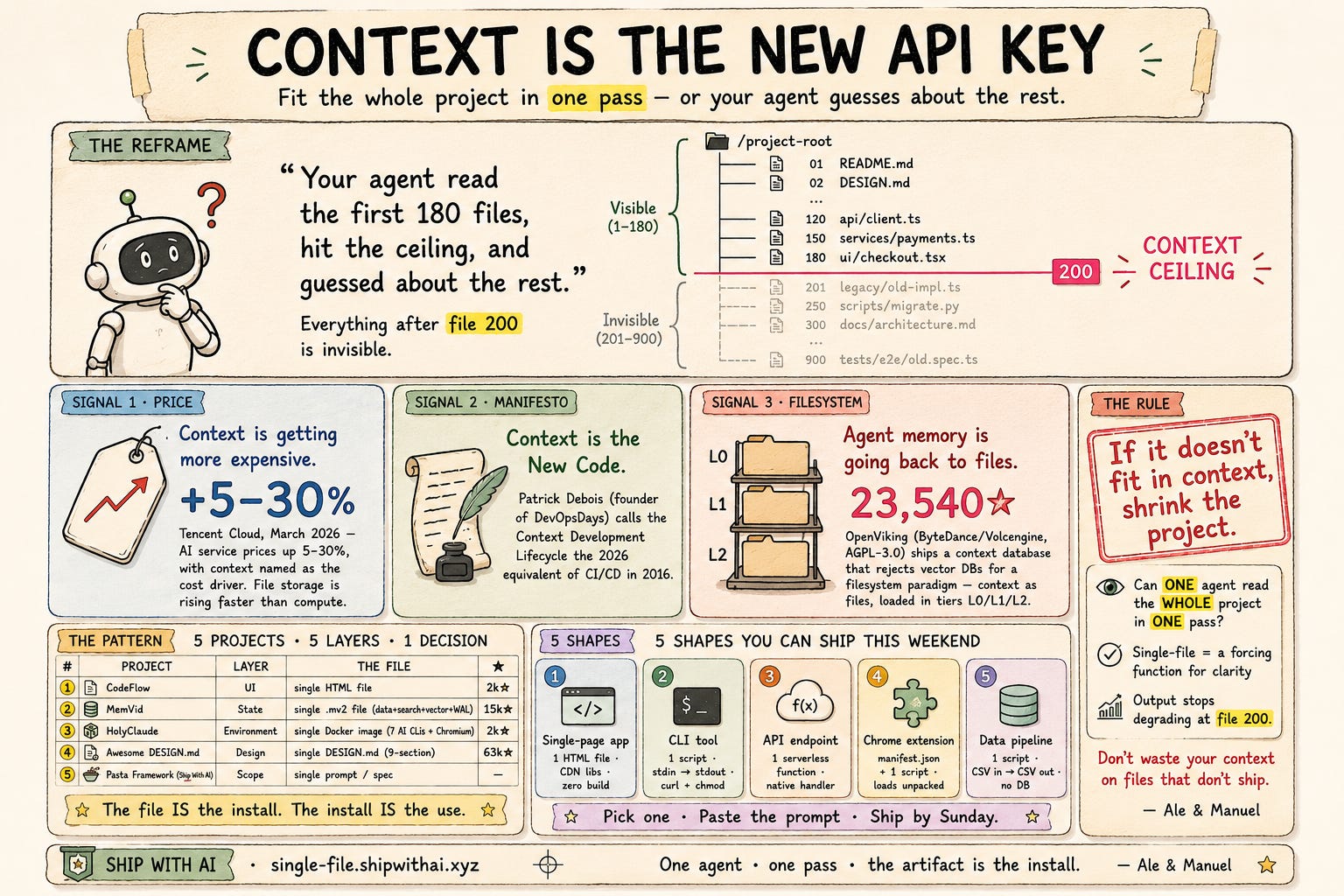
Last month we shipped a harness. Two weeks ago we shipped a pre-flight checklist. Last week we shipped a steering loop. Every edition assumes the same thing: that your agent can read your project.
We were wrong to assume that.
Last Saturday we pointed Claude Code at autom8n — our n8n workflow generator, the product we've been building since March. The agent read CLAUDE.md, scanned the directory tree, and started writing. Within four turns it generated a PR that referenced three files that hadn't existed since April 15.
The agent didn't hallucinate the files. It hallucinated which version of the project it was working on. It read the first 180 files, hit its effective context ceiling, and started guessing about the rest.
Your agent's output quality is a function of what fits in context. And for most projects, everything after file 200 is invisible.
This is not a prompt engineering problem. It's an architecture problem. And the winning architecture for 2026 side projects is simpler than you think: fit the whole project in context.
Yesterday: dragging n8n nodes, debugging connections, JSON typos at midnight. Counted the Saturday hours you've burned on it?
That's the real bill. It doesn't show up on your cloud invoice. It shows up as Sundays you didn't ship.
Autom8n skips it. Type the workflow in plain English. Get the n8n JSON in 5 minutes — with a guide so you actually understand what's running. The first one needs a tweak. The fifth saves you a Saturday.
Context is the new API key
Three signals converged on this in the last 30 days:
Tencent Cloud's pricing update. March 2026: Tencent announced AI service price increases of 5–30%, explicitly citing context as the cost driver. Their parallel file storage pricing — the infrastructure that feeds context to agents — is rising faster than compute. Context is literally getting more expensive, quarter over quarter.
Patrick Debois called it. The founder of DevOpsDays published "Context is the New Code" — arguing that the "Context Development Lifecycle" is the 2026 equivalent of what CI/CD was in 2016. His thesis: engineers who treat context as an asset that degrades will outperform engineers who treat it as free.
OpenViking shipped a filesystem for agent memory. OpenViking (23,540★, AGPL-3.0) from ByteDance's Volcengine arm launched a context database that explicitly rejects vector DBs in favor of a filesystem paradigm — context stored as files in directories, loaded in tiers (L0/L1/L2), with visualized retrieval trajectories so you can see what your agent actually read. The repo description: "OpenViking is an open-source context database designed specifically for AI Agents… through a file system paradigm."
The conclusion isn't subtle. Context is the bottleneck, and context-aware architecture is the fix.
The single-file pattern: proven, copyable, 5 shapes
Five independent projects. Five different layers of software. One shared architecture decision:
CodeFlow | UI | Single HTML file (GitHub API client-side) - 2k stars
MemVid | State | Single
.mv2file (data + search + vector + WAL) - 15k starsHolyClaude | Environment | Single Docker image (7 AI CLIs + headless Chromium) - 2k stars
Awesome DESIGN.md | Design | Single
DESIGN.mdfile (9-section format) - 63k starsPasta Framework (Ship With AI) | Scope | Single prompt or single spec
Five independent authors. Five different layers. One shared outcome: the file is the install. The install is the use. No npm install. No docker compose up. No .env file with 14 variables. Just open, copy, or paste.
What makes this work: an agent can read the entire project in one pass. No file 201 missing. No version skew between what the agent sees and what ships. The artifact that ships is exactly what the agent read.
Grab the cheatsheet: All five paste-in prompts — plus the master Ship in 30 Seconds meta-prompt that picks the right shape for your idea — live on one page at single-file.shipwithai.xyz. No signup. No email. Just prompts you can copy and use this weekend.
5 shapes you can ship this weekend
Pick one. Paste the prompt. Ship by Sunday.
Shape 1 — Single-page app (CodeFlow pattern)
What it is: One HTML file. Everything — UI, logic, API calls, styling — in one self-contained page. Zero build step. Open in any browser.
Paste-in prompt:
Build a single HTML file that does [YOUR APP IDEA]. Requirements:
- All HTML, CSS, and JavaScript in ONE file. No external dependencies except CDN-hosted libraries (Tailwind, Alpine.js, htmx).
- The file must work when opened directly in a browser — no build step, no npm, no server.
- Include a dark-mode toggle, responsive layout, and localStorage persistence.
- Output only the complete HTML file with inline everything.
Shape 2 — CLI tool (single Python/Rust/Go file)
What it is: One script that does one job. No package. No virtualenv. Install is curl + chmod.
Paste-in prompt:
Build a CLI tool as a single [Python/Rust/Go] file that does [YOUR TOOL IDEA]. Requirements:
- ONE file. No imports of local modules — only standard library or well-known public packages.
- Usage: pipe input via stdin, get output via stdout. No interactive prompts.
- Include --help with examples, error handling for missing dependencies, and a shebang line.
- Output only the file. The user installs with: curl -O [url] && chmod +x [file]
Shape 3 — API endpoint (single serverless function)
What it is: One file deployed as a serverless function. No framework. No database unless it's embedded.
Paste-in prompt:
Build a serverless API endpoint as a single file for [PLATFORM: Vercel/Cloudflare Workers/AWS Lambda] that does [YOUR API IDEA]. Requirements:
- ONE file. Handle request, validate input, return JSON response.
- No ORM. No Express/Fastify/Next.js. Use the platform's native request handler.
- Authentication: simple API key check from environment variable.
- Include CORS headers, rate limiting stub, and error response format.
- Output only the file + deployment command.
Shape 4 — Chrome extension (manifest + one script)
What it is: One manifest.json + one script. The minimal surface area for a browser extension.
Paste-in prompt:
Build a Chrome extension as TWO files (manifest.json + one script) that does [YOUR EXTENSION IDEA]. Requirements:
- manifest.json: Manifest V3, minimal permissions.
- script.js/content.js: All logic in one file. Use vanilla JS or a CDN-hosted library.
- The extension should work when loaded unpacked — no build step.
- Output both files with installation instructions.
Shape 5 — Data pipeline (single script + CSV)
What it is: One Python or Node script. Input: CSV/JSON. Output: transformed CSV/JSON. No database, no scheduler, no dashboard.
Paste-in prompt:
Build a data pipeline as a single [Python/Node] script that does [YOUR PIPELINE IDEA]. Requirements:
- ONE file. Read from stdin or a file path argument. Write to stdout or an output path.
- No database. No Airflow/Prefect/Dagster. No Docker.
- Handle: missing columns, empty files, encoding issues.
- Include: a --dry-run flag, a --sample N flag, and a progress indicator.
- Output only the file.
Ship it in 30 seconds
Five shapes. One paste-in prompt. Your agent picks the right one:
I have an idea for a project. Before I write any code, help me fit it into a single-file architecture that one agent can read in one pass.

Step 1: Read my idea. Then pick ONE of these 5 shapes (the one that fits best):
- Single-page app (1 HTML file, CDN libs, localStorage)
- CLI tool (1 script, stdin/stdout, curl install)
- API endpoint (1 serverless function, native handler)
- Chrome extension (manifest.json + 1 script)
- Data pipeline (1 script, CSV in, CSV out)

Step 2: Explain WHY that shape fits (one sentence) and WHY the other 4 don't (one sentence each).

Step 3: Generate the complete file(s). All code inline. Zero build steps. Zero package.json files. Max 2 files total.

Step 4: Output a README with: what the file does, how to run it, and what to paste into the next prompt when I want to extend it.

My idea: [PASTE YOUR ONE SENTENCE HERE]
One prompt. One shape. One pass.
The agent reads the whole project. The output doesn't degrade at file 200. The artifact is the install.
The rule: if it doesn't fit in context, shrink the project
Before you write a line of code, ask: can one agent read the entire project in one pass?
If the answer is no, the project is already too large for its own good — and it hasn't been built yet. Cut scope until the answer is yes.
The alternative is what we shipped last Saturday: an agent that read half the project, guessed about the rest, and generated a PR that referenced dead files. That's not a bug. It's the default behavior when context runs out.
Single-file architecture is not a limiting constraint. It's a forcing function for clarity.
When every file counts, you stop adding things that don't. One agent, one pass, and the output stops degrading at file 200. And when the artifact is the install, distribution costs you nothing.
Your context window is your new API key. Don't waste it on files that don't ship.
— Ale & Manuel
PS. What's the smallest file that ships your project? Reply with your single-file artifact and we'll feature the best ones — the simpler, the better. And grab all five shapes at single-file.shipwithai.xyz — no signup, just prompts.
When you're ready, two more ways we can help:
1. AI Side-Project Clarity Scorecard. Find what's blocking you from shipping your first side project.
2. NoIdea. Pick a ready-to-start idea born from real user problems.