
Get Feedback While You Build
Your MVP Is Built. Don't Add Features, Show It to Five People This Weekend


Before you spend another hour configuring n8n nodes, pause for a moment.
We know what it feels like to have the perfect workflow in mind — and then hit the setup wall.
Dragging nodes.
Reading API docs.
Testing connections.
Wondering if you’re doing this the “right way.”
After watching dozens of developers build the same workflows from scratch, we noticed something.
The hard part isn’t knowing what to automate. It’s the manual translation from idea to working n8n workflow.
That’s why we built Autom8n.
✨ From description to deployment in minutes
Tell us what you want to automate.
Get a complete n8n workflow — nodes configured, connections set, ready to deploy.
No more setup hell. No more node-by-node building.
Before you open another API doc or drag another node...
Hey there,
Your MVP is built, let’s count what usually happens next. Most developers follow this sequence after their first working build:
Add a settings page — nobody asked for it. 45 minutes.
Build email notifications — nobody asked for them. 90 minutes.
Improve the UI — nobody complained about it. 60 minutes.
Add filters to the dashboard — nobody needed them yet. 45 minutes.
Refactor the code “before anyone sees it” — nobody will see the code. 60 minutes.
Finally show it to someone two weeks later — they use it for 30 seconds and say “I wish it did X.”
Five features built and five hours spent; zero of those features were what the first user actually needed. The one thing they wanted —> X <— you didn’t build because you were busy adding things nobody requested.
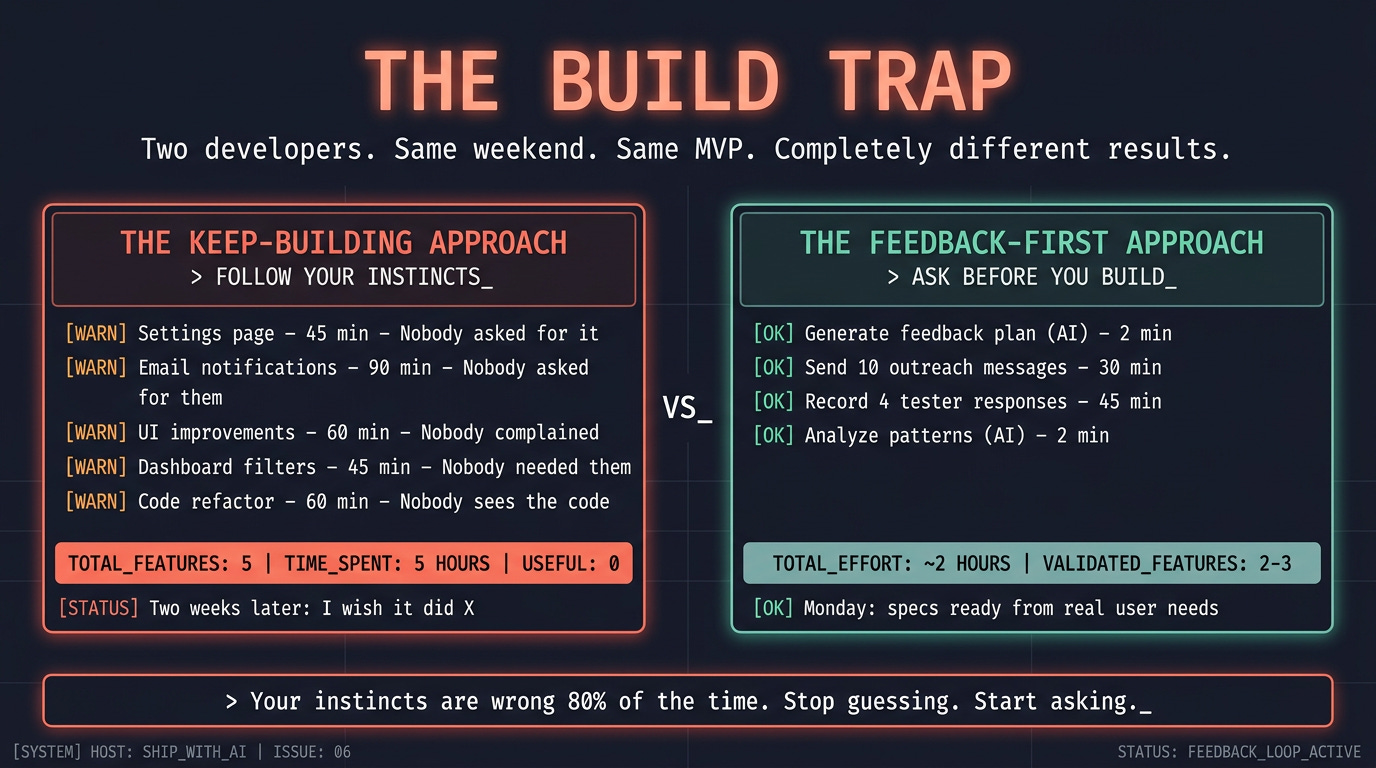
This is the build trap. Your instincts for what to build next are wrong 80% of the time, because you’re guessing from the builder’s perspective, not the user’s. The only way to fix this is to show the MVP to real people before you add anything.
Not “someday,” not “when it’s ready,” Now. Today. While the build is fresh and your energy is high.
The blocker: You build features based on your own assumptions, by the time you show someone, you’ve wasted hours on things they don’t need and missed the thing they do.
What changes today: You install a skill that handles the entire feedback process. It generates your outreach plan and messages, provides a structured feedback log, and, when responses come in, analyzes patterns and automatically writes your next specs. You focus on the human part, sending messages and having conversations while the agent handles the rest.
The transformation: 5 assumed features (5 hours wasted) → 2-3 requested features (every hour counts).
Why Your Instincts Are Wrong
You’re not bad at product thinking, you’re just biased.
You’ve been inside this project for weeks. You know every shortcut, every limitation, every decision. When you use your own MVP, you unconsciously avoid the broken parts, navigate the confusing parts, and focus on the parts that work well: your mental model of the product is not the user’s experience of the product.
Three specific ways this bias burns you:
You optimize for completeness, not for value. You see the missing settings page and think, “That’s incomplete.” A user sees the core feature and thinks, “This solves my problem.” The settings page doesn’t block them. The missing export button does. But you don’t know that because you haven’t asked.
You fix what bothers you, not what blocks them. The code structure feels messy to you. You want to refactor before anyone sees it. The user will never see the code. They’ll see the UI. And the one UI element that confuses them—the button you labeled “Submit” when they expected “Save” — you don’t notice because you built it.
You build for an imaginary scale, not for actual use. “What if 100 users sign up at once?” Zero users have signed up. Build for the first one. Then the fifth. Scale problems are good problems — they mean people want what you built. You’re solving problems you don’t have yet while ignoring problems you don’t know about.
The fix is not “be less biased.” The fix is external input, someone who isn’t you, using your product for the first time, telling you what’s confusing, what’s missing, and what works.
The Skill: collect-feedback
This issue’s artifact is different from what you usually have. Issues 01-04 gave you files you create once. Issue 05 gave you a prompt to run before a build session. This issue gives you a skill—a reusable tool your agent uses every time you need to collect and act on feedback.
The skill has two modes:
PLAN mode: you type something like “I need feedback on my MVP” or “help me find testers” in Claude Code. The skill’s description matches, it triggers automatically, reads your project, and generates everything: where to find testers, copy-paste outreach messages, a test script for testers to follow, five targeted questions, and a structured feedback log. You send the messages. The human part stays human.
ANALYZE mode: you fill in the feedback log as responses come in. When you have 3+ responses, you type “analyze the feedback in /feedback/feedback-log.md” in Claude Code. The skill triggers again, parses the log, runs the analysis script, applies the pattern filter (3+ testers = spec it, 2 = note it, 1 = ignore), and generates ready-to-build specs directly into your /specs/ folder.
Here’s the folder structure:
collect-feedback/
├── SKILL.md                          ← Instructions + two-mode workflow
├── scripts/
│   └── analyze_feedback.py           ← Parses log, counts patterns, ranks by frequency
├── references/
│   └── outreach-templates.md         ← Message patterns by platform (Reddit, Discord, DM)
└── assets/
    └── feedback-log.md               ← Structured template, one section per tester
Drop it into your skills directory:
.claude/skills/collect-feedback/That’s it. The skill is installed.
When and How Each Mode Triggers
The skill triggers automatically in Claude Code based on what you type. Here’s the reference:
PLAN mode activates when you say things like:
“I need feedback on my MVP”
“Help me find testers for my project”
“I just built this. How do I get user feedback?”
“Should I add more features?” (The skill redirects you to collect feedback first)
What happens: The skill reads your PROJECT.md and codebase, then creates two files:
/feedback/feedback-plan.md— your outreach plan with messages, test script, and questions/feedback/feedback-log.md— empty structured log, ready for you to fill in
ANALYZE mode activates when you say things like:
“Analyze the feedback in /feedback/feedback-log.md”
“I’ve collected feedback from testers and generated specs from the patterns.”
“What should I build next based on my feedback log?”
What happens: The skill reads /feedback/feedback-log.md, runs scripts/analyze_feedback.py, and creates:
/feedback/analysis.md— pattern summary with counts and verdicts/specs/fix-[name].md— fix specs for UX blockers (3+ testers)/specs/feature-[name].md— feature specs for missing capabilities (3+ testers)
Important: ANALYZE mode requires at least 3 testers in the feedback log. If fewer than 3 have responded, the skill warns you and suggests getting more responses before generating specs. Below 3, patterns aren’t reliable.
Now let’s use it.
Saturday Afternoon: PLAN Mode
Open Claude Code in your project directory. Type:
I just built my MVP and I need to get feedback from real users this weekend.The collect-feedback skill triggers automatically — its description matches phrases like “need feedback,” “find testers,” or “just built my MVP.” You’ll see something like:
The "collect-feedback" skill is loadingThe skill reads your PROJECT.md to understand what you built and who it’s for. It scans your codebase to identify which features are testable. Then it generates a feedback plan (saved to /feedback/feedback-plan.md) with five sections:
What the Plan Contains
1. Tester Profile
Not “users.” A specific description of who to find. “Freelancers who send 5+ invoices per month and have complained about invoicing tools.” The skill derives this from your PROJECT.md’s target user and problem statement.
2. Where to Find Them
Two specific Reddit subreddits (real, active, with search queries to find recent posts about the problem). One additional community (Discord, Slack, forum). For each: how many people to message and expected response rate. The skill picks these based on your product’s domain — it doesn’t suggest r/webdev for an invoicing tool.
3. Outreach Messages
Three copy-paste messages ready to send. One for Reddit DMs, one for community posts, one for people you know directly. Each is customized to your product’s specific problem. Under 80 words each. Each explicitly asks for criticism, not praise.
The skill pulls structural patterns from references/outreach-templates.md and fills them with your project’s specifics. The result is a message that references the real problem your product solves, not a generic “check out my project.”
Here’s what a generated Reddit DM looks like for a feedback collection tool:
Hey — saw your post about struggling to collect user feedback without
annoying survey tools. I built a lightweight feedback widget this
morning — you embed it in your app and responses go straight to a dashboard.

It's rough but the core flow works. Would you try it for 5 minutes
and tell me what's confusing or missing? Not selling — just need
honest input from someone who actually has this problem.

[link]
That’s generated, not written by you. The skill was produced from your PROJECT.md. You review it, tweak if needed, and send.
4. Test Script
4-6 steps that walk a tester through the core value. Not a feature tour. A task they’re trying to accomplish. Derived from your actual feature set.
1. Open [URL]
2. Sign up with email
3. Create a new feedback form with 3 questions
4. Copy the embed code
5. Open the preview and submit a test response
6. Check the dashboard — your response should appear within seconds
The skill identifies which steps are most likely to cause confusion based on your current UI state. It flags them so you know where testers might get stuck.
5. Follow-Up Questions
The same five questions, customized with examples relevant to your product:
1. Where did you get stuck or confused?
2. What did you expect to happen that didn't?
3. What's the first thing you'd want to change?
4. Would you use this tomorrow to collect feedback? Why or why not?
5. What would make you pay $X/month for this?
The skill also creates a feedback log at /feedback/feedback-log.md — copied from assets/feedback-log.md — with one structured section per tester, ready for you to fill in.
What You Do With the Plan
Open
/feedback/feedback-plan.mdGo to the subreddits listed. Search the queries provided. Find 8-10 people who posted about the problem in the last 30 days.
Send the Reddit DM to each. Copy-paste, personalize the first line with something from their actual post.
Post the community message in 1-2 relevant Discord servers or forums.
Send the direct message to 2-3 people you know who have the problem.
Target: 10-15 outreach messages. Expect 3-5 responses. That’s your testing cohort.
This is the part that stays human: you’re not automating relationship-building, you’re automating the preparation instead, so the human part is as easy as copy-paste-send.
Saturday Evening: Prepare for Responses (15 minutes)
While you wait for responses, do two things:
1. Share the test script and questions. When someone responds, “Sure, I’ll check it out,” send them the test script and tell them, “Try these steps. After, I have 5 quick questions. Takes 5 minutes total.” The test script and questions are already in your feedback plan. Copy and send.
2. Skim the outreach templates reference. The skill is loaded references/outreach-templates.md when generating your plan, but it’s worth a quick read yourself. It explains why each message pattern works and lists anti-patterns to avoid. If any testers push back or don’t respond, the reference has alternate approaches.
Then close the laptop. Responses come in over Saturday night and Sunday.
Sunday: Fill the Feedback Log
As responses arrive, open /feedback/feedback-log.md and fill in each tester’s section:
## Tester 1

- **Name/Handle:** u/freelance_mike
- **Source:** Reddit
- **Date:** 2026-03-15
- **Test completed:** partial
- **Stuck points:** Couldn't figure out how to copy the embed code —
  the button said "Share" and he expected "Get Embed Code"

### Responses

1. **Stuck/confused:** The share button — I thought it would share
   a link, not give me embed code
2. **Expected but didn't happen:** I expected to see response analytics,
   not just raw responses
3. **First thing to change:** The button labels — Share vs Embed is confusing
4. **Would use tomorrow (why/why not):** Yes if the embed actually works
   on my site — didn't test that part
5. **Would pay for:** Analytics on responses — who responded, when,
   completion rates

### Direct quotes

> "The Share button threw me off completely — I almost closed the tab"

### Your read

Button labeling is a real problem. Analytics is a real want, not just nice-to-have.
Don’t analyze yet. Don’t start building. Just record. Fill in each tester as they respond. You’re collecting data, not acting on it.
Sunday Evening: ANALYZE Mode
You have 3+ testers in the feedback log. Open Claude Code and type:
I've collected feedback from testers in /feedback/feedback-log.md — analyze
the patterns and generate specs for anything 3 or more testers mentioned.
The skill triggers ANALYZE mode. It reads /feedback/feedback-log.md, runs scripts/analyze_feedback.py to parse and count patterns, then does the real work: identifying what to build next.
What the Analysis Produces
The script outputs a structured analysis. The agent reads it and generates:
1. Pattern Summary
UX BLOCKERS (3/4 testers — ACTION: SPEC IT)
  - "Share" button confused testers — expected "Embed Code" or "Get Code"
  - Testers: u/freelance_mike, @sarah_builds, Alex K.

MISSING FEATURES (3/4 testers — ACTION: SPEC IT)
  - Response analytics (who responded, when, completion rate)
  - Testers: u/freelance_mike, @sarah_builds, Dave M.

PRIORITY CHANGES (2/4 testers — ACTION: NOTE IT)
  - Better mobile experience for the feedback form
  - Testers: @sarah_builds, Dave M.

CORE VALUE: POSITIVE — 3/4 testers said they'd use it tomorrow
REVENUE SIGNAL: 3/4 testers mentioned willingness to pay for analytics
The pattern filter is applied automatically:
3+ testers mentioned it → SPEC IT — the agent generates a spec
2 testers mentioned it → NOTE IT — logged in the backlog, not a spec yet
1 tester mentioned it → IGNORE — individual preference, not a pattern
2. Generated Specs
The agent writes specs directly into your /specs/ folder. Real specs. Issue 03 format. Referencing real files and components from your project.
For the UX blocker:
# Fix: Rename Share Button to Get Embed Code

## Context

- Feedback form builder at /app/forms/[id]/page.tsx has a "Share" button
- Button currently copies embed code to clipboard
- 3/4 testers expected "Share" to share a link, not provide embed code

## Requirements

1. Rename button from "Share" to "Get Embed Code"
2. Add tooltip on hover: "Copy embed code to clipboard"
3. Keep the same clipboard-copy functionality

## Constraints

- Do NOT change the embed code format
- Do NOT add a separate share-link feature (that's a different spec)

## Acceptance

- [ ] Button reads "Get Embed Code"
- [ ] Clicking copies embed code to clipboard
- [ ] Tooltip appears on hover
For the missing feature:
# Feature: Response Analytics Dashboard

## Context

- Responses currently display as a raw list at /app/forms/[id]/responses/page.tsx
- Data lives in the responses table (id, form_id, answers, created_at, completed_at)
- 3/4 testers wanted analytics: who responded, when, completion rates

## Requirements

1. Add analytics summary at the top of the responses page
2. Show: total responses, completion rate, responses over time (last 7 days)
3. Use existing chart components from /components/ui/ if available
4. Data from responses table — aggregate with SQL, don't compute client-side

## Constraints

- Do NOT add individual user tracking
- Do NOT install a new charting library if one exists
- Do NOT move or modify the existing response list

## Acceptance

- [ ] Analytics summary appears above the response list
- [ ] Total count matches actual responses in database
- [ ] Completion rate is accurate (completed_at not null / total)
- [ ] Time chart shows last 7 days of responses
These specs are ready to hand off. No editing needed. The agent wrote them based on actual feedback, referencing files from your project and following your skills in page and component patterns.
3. Build Recommendation
The agent ends with a priority order:
RECOMMENDED BUILD ORDER:
1. Fix: Rename Share button (5 min — UX blocker, 3/4 testers)
2. Feature: Response Analytics (20 min — most requested, revenue signal)

BACKLOG (not yet validated):
- Mobile form experience (2/4 testers — wait for more signal)

VERDICT: Core value is validated. 3/4 testers would use this.
Analytics is the revenue unlock — build it next.
What You Do Monday Morning
You open /specs/. Two specs are waiting. Both based on what real people said, not what you guessed. You hand off the 5-minute fix first. Then the analytics feature. By Monday afternoon, your product is better in the exact ways your testers needed.
And you didn’t waste a single hour on features nobody asked for.
The Feedback Loop (It Doesn’t Stop Here)
The skill isn’t a one-time thing. It’s part of your permanent workflow.
Every time you build a batch of features, the loop runs again:
Build features (Issue 05) → Collect feedback (PLAN mode) → Record responses
→ Analyze patterns (ANALYZE mode) → Specs generated → Build features → ...
Your 5 testers from this weekend become your testing cohort. The skill tracks who they are and what they’ve already tested. Each cycle:
You build 2-3 features from the last round of specs
You type “I need another round of feedback on the latest changes” in Claude Code
The skill triggers PLAN mode again and generates a follow-up outreach message: “You said X was confusing — I fixed it. Want to check if it’s better? Plus I added [new feature] based on your suggestion.”
You send it. They test. You fill in the log. The agent analyzes. New specs appear.
By the time you launch (Issues 07-08), your first 5 testers have shaped the product. They’re invested. They’ve seen it improve in response to their input. Some of them will tell others. Some of them might be your first paying customers.
Common Objections (And Why They’re Wrong)
“My MVP isn’t ready to show anyone.”
Yes, it is. You passed the first user test script from Issue 05. If someone can sign up and complete the core flow, it’s ready. “Ready” doesn’t mean polished. It means functional. The skill generates outreach messages that set expectations—“rough” and “just built.” Testers expect rough.
“I don’t know where to find testers.”
The skill finds them for you. It reads your project, identifies the problem you solve, and suggests specific subreddits with search queries to find people who recently posted about that problem. You search, find posts, send DMs. The skill did the research. You do the outreach.
“Nobody responded to my outreach.”
Send more messages. 10 DMs should produce 2-3 responses. If you sent 10 and got zero, show the outreach message to the agent and ask them to improve it. The skill’s reference file outreach-templates.md has anti-patterns — your message probably comes across as too salesy or too generic.
“The feedback is contradictory, one person wants X, another wants Y.”
That’s why the pattern filter exists. The skill won’t generate a spec for something only one tester mentioned. 3+ testers = real pattern. Below that, it’s noise. The analysis script counts automatically; you don’t have to judge which feedback “feels” more important.
“I’d rather build a few more features and then get feedback.”
That’s the build trap. Every feature you build before feedback is a bet. The skill takes 2 hours and gives you certainty about what to build next. Building three more features takes a full day and gives you more guesses. The math isn’t close.
Here’s what you learned today:
Your instincts for what to build next are wrong 80% of the time. You’re biased by being inside the project. Only external input corrects this.
The collect-feedback skill automates both sides of the process. Type “I need feedback on my MVP” in Claude Code → PLAN mode generates outreach plan, messages, test script, and feedback log. Type “analyze the feedback in /feedback/feedback-log.md” → ANALYZE mode reads the log, counts patterns, and writes specs to
/specs/.Five questions produce actionable specs, not compliments. UX friction, expectation gaps, priority signal, core value test, and willingness to pay. “What do you think?” produces nothing.
The pattern filter is enforced by the analysis script. 3+ testers → spec it. 2 → note it. 1 → ignore.
scripts/analyze_feedback.pycounts automatically. No judgment calls, no reacting to one person’s opinion.Specs generated from feedback reference your real project. They follow Issue 03’s format, use your existing skills, and land
/specs/ready for handoff. The loop closes: build → feedback → spec → build.
Phase 3 is complete. You can build an MVP in one session and validate it with real users the same weekend.
Next week, we go live. Your MVP is built, and testers confirmed the core value works. Now you deploy it, real URL, real domain, real infrastructure, in 60 minutes. Not “eventually.” Not “when I figure out hosting.” Next Saturday.
Issue 07: From Localhost to Live in 60 Minutes.
But first, copy the collect-feedback folder into .claude/skills/. Open Claude Code. Type “I need feedback on my MVP.” The skill generates your plan and messages — everything lands in /feedback/. Send 10 messages today. Fill in /feedback/feedback-log.md as responses arrive. Tomorrow evening, type “analyze the feedback in /feedback/feedback-log.md and generate specs.” By Monday morning, your /specs/ folder will have exactly what to build next — because your testers told you.
Stop guessing. Start asking.
See ya next week,
— Ale & Manuel
PS. If this saved you from building five features nobody asked for, share it with a developer who’s been polishing instead of shipping.
And whenever you are ready, there are 2 ways I can help you:
1. AI Side-Project Clarity Scorecard (Discover what’s blocking you from shipping your first side-project)
2. NoIdea (Pick a ready-to-start idea created from real user problems)